Simple Blob Storage (SBS)
Simple Blob Storage (SBS) mode transforms koala into a lightweight HTTP REST interface for archival storage. It provides easy access to bitstream preservation without the overhead of full SIP/DIP processing and metadata indexing.
When to Use SBS
SBS is ideal when:
- IBM Spectrum Protect is already used for backup purposes and you need simple HTTP access to stored bitstreams
- You only need bitstream preservation without rich metadata
- You want a lighter deployment with fewer components
- You need a simple upload/download API for binary objects
Prerequisites
SBS mode requires fewer components than full mode:
| Component | Required |
|---|---|
| Web (Flask API) | Yes |
| Retriever | Yes |
| Purger | Yes |
| Stats | Yes |
| Scheduler | No |
| Loader | No |
Configuration
Enable SBS mode by setting:
default_simple_store_mode_enabled = true
In SBS mode, the following features are not available:
- SIP/DIP package processing
- Scheduler-based ingest
- Loader states (virus scan, validation, etc.)
- METS metadata handling
- Filetype validation
- Schema validation
Data Flow
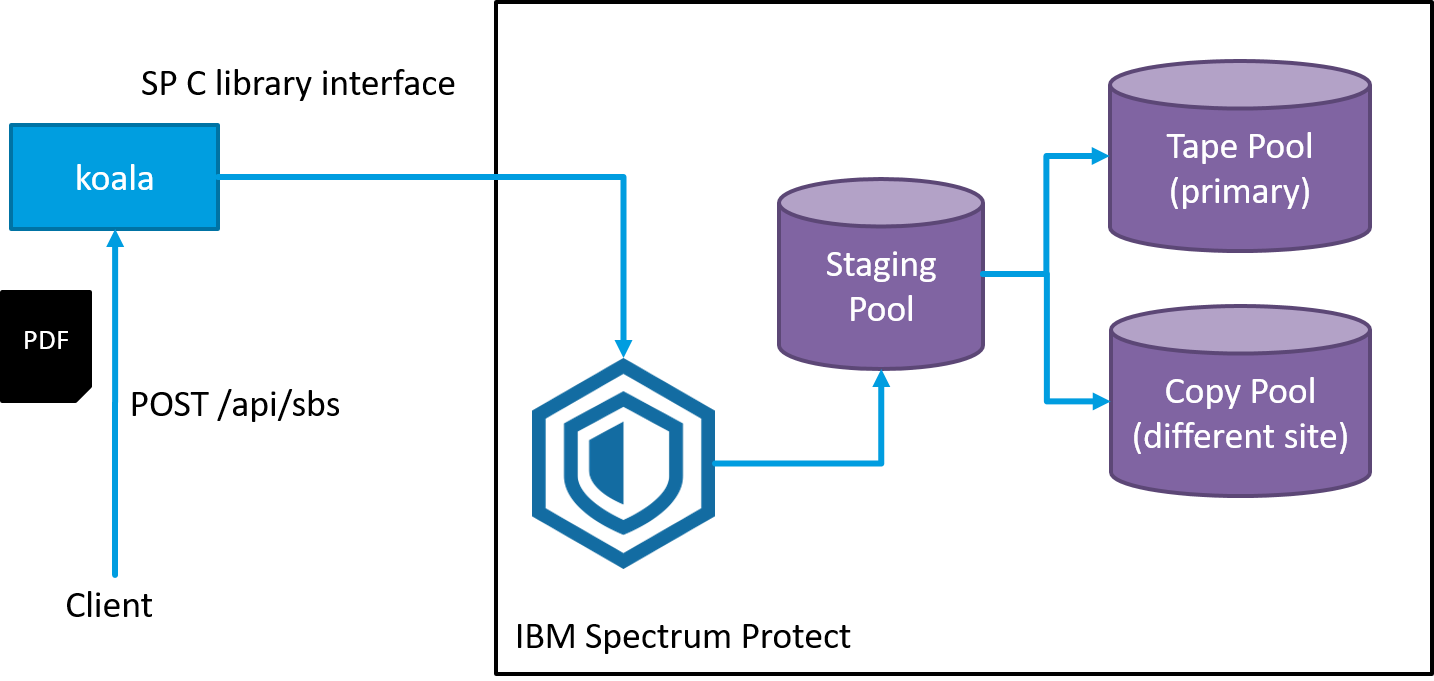
Example: A client uploads a PDF file via HTTP to koala. Koala uses IBM Spectrum Protect (SP) libraries to save the data into the SP staging pool. SP asynchronously copies files to various tape pools according to its internally configured storage rules.
API Endpoints
See the API documentation for full endpoint details.
Upload
curl -X POST --data-binary @"myfile" --user user:pw https://<koala-host>/api/sbs
Response:
{"internal_asset_id": "63b54de9-dc2b-4bff-be28-e2ad92d02b5c"}
Download (asynchronous)
Trigger a retrieve job:
curl -X POST -H "Content-Type: application/json" \
  -d '{"internal_asset_id": "63b54de9-dc2b-4bff-be28-e2ad92d02b5c"}' \
  --user user:pw https://<koala-host>/api/sbsr
Check status:
curl -u user:pw https://<koala-host>/api/sbsr/<session_id>
When ready, a 303 See Other redirect provides the download URL.
Delete
curl -X DELETE -u user:pw https://<koala-host>/api/sbs/<internal_asset_id>
Limitations
- No metadata preservation — only raw bitstreams are stored
- No format validation or file type checking
- No virus scanning
- No SIP/DIP compliance
- No audit trail for individual uploads/downloads
- No callback webhooks for SBS operations
Comparison: SBS vs Full Mode
| Feature | SBS Mode | Full Mode |
|---|---|---|
| Bitstream storage | Yes | Yes |
| Metadata (mets.xml) | No | Yes |
| SIP/DIP processing | No | Yes |
| Virus scanning | No | Yes |
| Schema validation | No | Yes |
| Asset versioning | No | Yes |
| Migration support | No | Yes |
| Callback webhooks | No | Yes |
| Components needed | 4 | 6+ |
| Deployment complexity | Low | High |