koala
Kooperatives Langzeitarchiv (koala) is a digital preservation service that integrates with existing data repositories to provide long-term archival of digital objects.

© aratehortua - stock.adobe.com
Overview
koala is a backend service designed to integrate with existing data repositories. It is not a user-facing application but a component in a service-oriented architecture that handles the full lifecycle of digital preservation:
- Ingest — Receive Submission Information Packages (SIPs) via SFTP or WebDAV
- Validate — Check metadata, scan for viruses, verify file integrity
- Archive — Store assets natively in IBM Spectrum Protect with replication across storage tiers
- Retrieve — Deliver archived assets back as Delivery Information Packages (DIPs)
- Manage — Track, audit, and monitor all operations through a web interface
Technical metadata gathering and basic validation must be performed before data enters koala.
How It Works
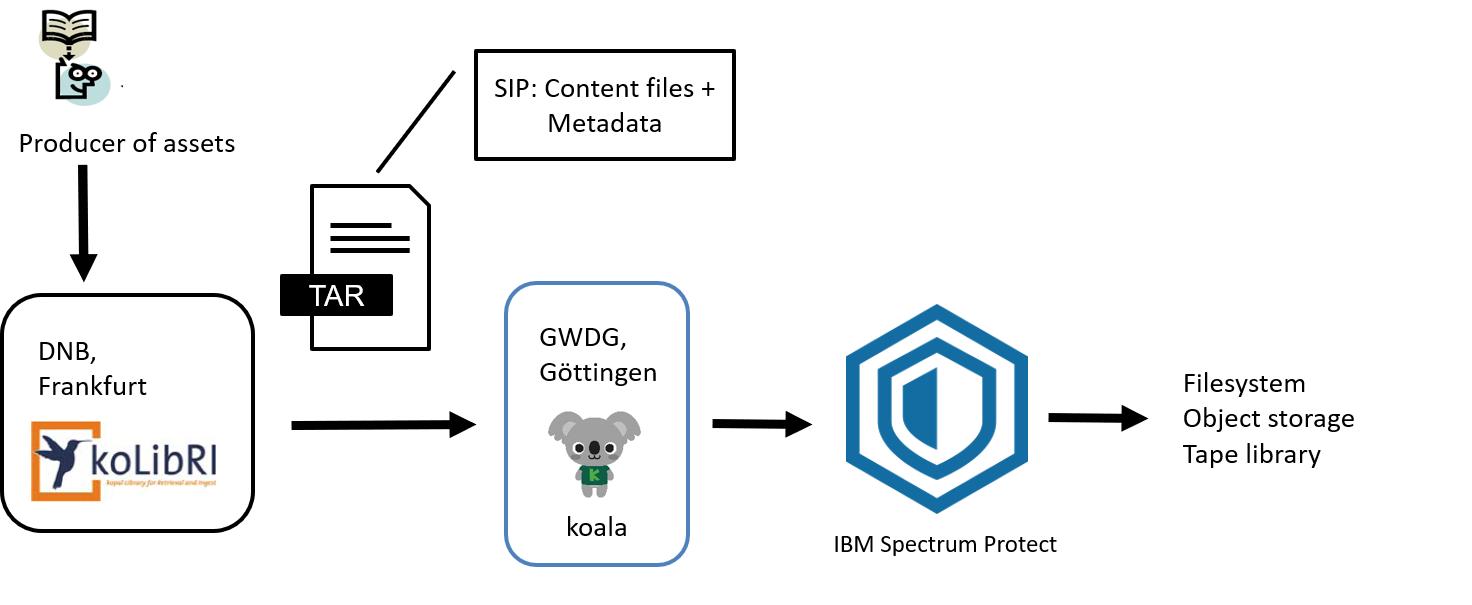
The GWDG / DNB Workflow
The GWDG operates koala as a cooperation partner of the Deutsche Nationalbibliothek (DNB) for digital long-term archiving. The DNB collects, archives, and catalogs all German and German-language publications — including digital records.
The typical workflow:
- A producer (e.g. a publishing house) delivers digital books to the DNB
- The DNB performs initial validation, extracts technical metadata, and creates a SIP (Submission Information Package) — an archive (zip, tar, tar.gz) containing content files and descriptive metadata (
mets.xml) - The SIP is transferred to koala via SFTP or WebDAV
- koala performs additional checks (virus scan, metadata validation, file type verification)
- The SIP is stored natively in IBM Spectrum Protect, which replicates data across tape, filesystem, and object storage backends for long-term integrity
Features
Ingest & Validation
- Multiple ingest protocols — SFTP and WebDAV for SIP delivery
- Flexible archive formats — zip, tar, tar.gz, 7z
- Virus scanning — Integrated ClamAV support for SIP content
- Metadata validation — XSD schema validation against stored schemas
- File type verification — DROID signature file support for format identification
- Metadata updates — Update existing assets without re-ingesting content
- Asset versioning — Track multiple versions of the same external asset with parent-child linking
- Migration support — Ingest migrated assets with automatic version resolution
Archival Storage
- IBM Spectrum Protect — Native integration with full tape/filespace/object storage support
- NFS/HSM fallback — Filesystem-based storage for lightweight deployments
- Automatic replication — Leverage SP storage rules for multi-site redundancy
- Efficient retrieval — Optimized restore ordering minimizes tape changes
- Optimize for ZIP — Skip repacking by using SIP directly as AIP
Retrieval
- Multiple request types — Full metadata, asset download, or consistency checks
- Batch retrieval — Retrieve multiple assets in a single request for tape efficiency
- Flexible output formats — Unpacked, zip, or tar DIPs
- Asynchronous processing — Long-running retrievals tracked via session IDs
- Consistency checks — Recalculate checksums and compare against stored values
- Modified AIPs discovery — Find created/deleted AIPs within a timeframe
Integration
- DIAS compliant — Full SIP/DIP interface compatible with DNB specifications
- REST API — Modern JSON interface for programmatic access
- Simple Blob Storage — Lightweight binary object upload/download API
- Callback webhooks — HTTP notifications on ingest/retrieve completion
Operations & Monitoring
- Administrative web UI — Live dashboards, status monitoring, system management
- Prometheus metrics — Ingest duration, transfer rates, error counts
- Audit logging — tracking of all administrative actions
- Multi-node deployment — Scale ingest workers horizontally
- Docker support — Containerized deployment with Docker Compose
- WebSocket/SocketIO — Real-time updates in the web UI
- Growth widget — Monthly ingest stats on dashboard
- No-ingests alerts — Email notification when no new ingests occur
- Usage consumption stats — Mass storage statistics emails
- Operations & Monitoring — minute/hour/day/week/month/year statistics granularity
Reliability
- Recovery from fatal states — Purger-based automatic recovery when loaders crash mid-ingest
- Circuit breaker — Auto-pauses scheduler when repeated errors indicate systemic issues
- Heartbeat monitoring — Continuous health signaling for container orchestration
- Retry mechanisms — Automatic retry on Redis/AMQP/HTTP failures (10 attempts)
Security & Authentication
- OpenID Connect — Enterprise SSO authentication
- LDAP — Directory-based user authentication
- Local accounts — Built-in user management for service accounts
- SSL/TLS — Encrypted connections for Web UI and API
- Role-based permissions — Granular access control
Administration
- Schema management — Full CRUD for XSD schemas via web UI
- Filetype import/export — Bulk import/export of file type definitions
- User management — Full CRUD for user accounts
- Collection management — Group schemas into collections
Administrative Dashboard

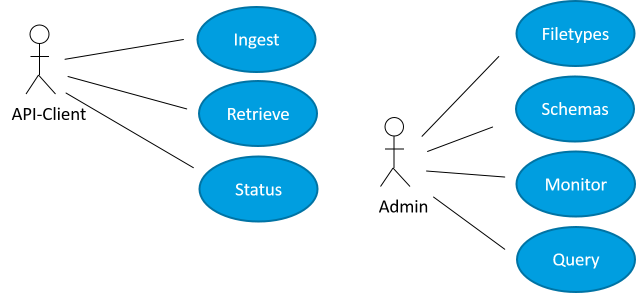
Actors
| Actor | Description |
|---|---|
| API Client | Remote application consuming the REST and SFTP interfaces to ingest and retrieve assets programmatically |
| Administrator | Human operator managing the system through the web interface — monitoring status, reviewing audits, performing administrative tasks |
Further Information
- Braunschweig, Björn: Digitale Langzeitarchivierung für die Deutsche Nationalbibliothek, GWDG Nachrichten 9-10/2015, S. 16 ff.
- Braunschweig, Björn: koala – neue Plattform zur Digitalen Langzeitarchivierung für die Deutsche Nationalbibliothek, GWDG Nachrichten 7/2018, S. 15 ff.
- GWDG koala project page: gwdg.de/web/guest/research-education/projects/koala
- kopal project portal: kopal.langzeitarchivierung.de