Concepts
Architecture
Koala consists of multiple separate processes (red) and middleware components (blue).
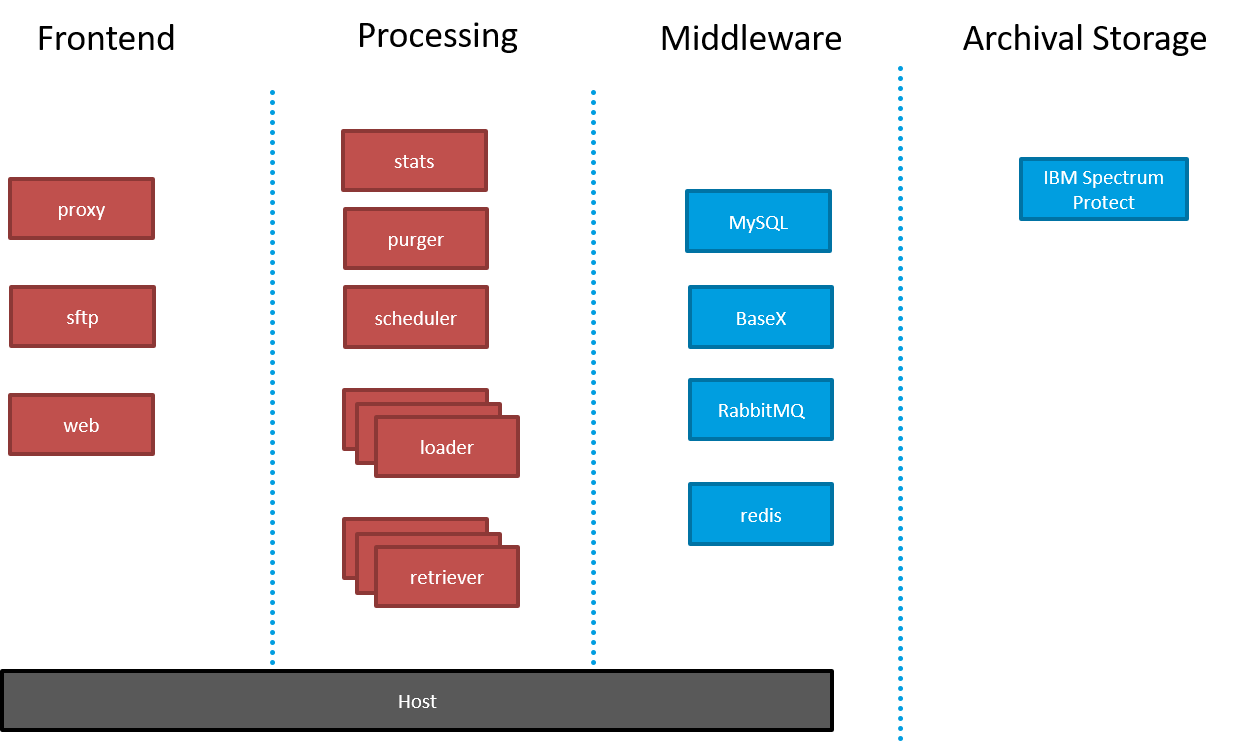
Middleware
Data Management (DB)
Primary datastore. Contains asset metadata, details about ingest and retrieval requests, as well as known filetypes, schemas, and user accounts.
Currently supported: MySQL
Message Queue (MQ)
The message queue is used to asynchronously route ingest and retrieval requests to loader/retriever applications.
Currently supported: RabbitMQ
Archival Storage
Physically stores the assets. Multiple implementations of an Archival Storage client are available:
- TSMClient — Full IBM Spectrum Protect integration via ctypes bindings to the native C API
- NFSHSMClient — Local filesystem-based archival for testing or lightweight deployments
The client is selected via the LTP_IMPLEMENTATION configuration variable.
Cache
Stores heartbeat information about running applications, shown on the web application. Retrieves and caches statistics about archived packages from the main database.
Currently supported: Redis
Applications
Scheduler
Monitors the upload directory for new SIPs and publishes the data for further processing to the message queue. Only one scheduler must be running at the same time.
Loader
Multiple loaders can be started simultaneously, connecting to the message broker and processing SIPs concurrently.
Processing includes the following steps:
- Unzipping/unpacking
- Virus scanning (ClamAV)
- Validating files and metadata
- Calculating checksums
- Storing metadata in DB and assets in Archival Storage
The status of the ingest process is continuously updated and can be monitored through the Web UI or API.
Proxy
A reverse proxy (nginx or Apache) for SSL offloading and serving of static content. Not a koala application — deployed externally.
Web
Provides an HTTP API for third-party applications and a web UI for admin operations. Includes WebSocket/SocketIO support for real-time dashboard updates.
Retriever
Multiple retrievers can be started simultaneously, connecting to the message broker and processing retrieval requests from clients. AIPs are fetched from the Archival Storage system, converted to a DIP, and saved in the HTTP-accessible downloadarea.
The status of the retrieval process is continuously updated and can be monitored through the Web application.
Purger
Monitors the downloadarea filesystem size and removes old packages once the high watermark is reached. Also handles recovery from fatal loader states by locking workareas and cleaning up incomplete ingest transactions.
Statistics
Queries the main database, calculates statistics, and saves the information in the cache. Supports five resolution levels: minute, hour, day, week, and month.
Processes
Ingest
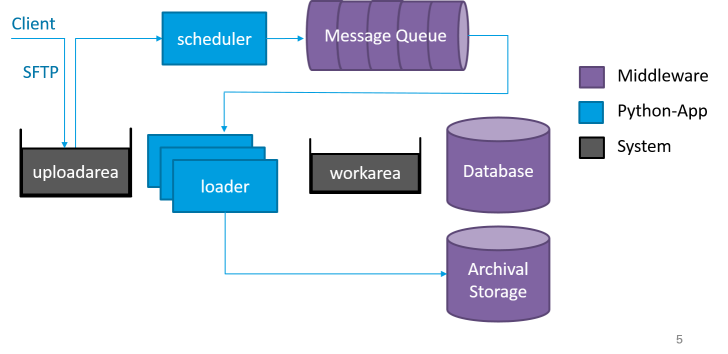
The ingest process is modeled as a state machine with done, error, and fatal end states. As soon as the client gets a "done" ticket from the web application, the AIP is saved on stable storage (archival storage) and every participating system has the required data (e.g., MDQI, data management).
Every ingest of a SIP is a "transaction" — a failing step triggers a recovery/rollback operation. Recovery is handled by:
- LoaderErrorState — for recoverable errors during normal processing
- Purger — for fatal errors where the loader crashed mid-operation
During recovery, the purger locks the corresponding workarea and blocks the loader from restarting until cleanup is complete.
Retrieve
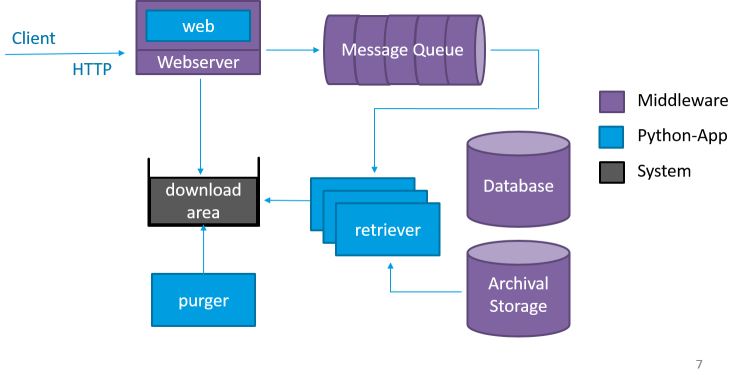
When a client requests a specific package, a retriever saves the data to the HTTP-accessible downloadarea. DIPs remain accessible until a configured threshold is reached (typically 70% downloadarea usage). Then DIPs are removed from oldest to newest by the purger.
Recovery
When a loader crashes during ingest (e.g., due to OOM, container restart, or hardware failure), the purger detects the orphaned workarea and initiates recovery:
- Purger acquires a lock on the workarea
- Rolls back partial changes (removes from DB, archival storage, MDQI)
- Cleans up temporary files
- Releases the lock, allowing the loader to resume
This ensures data consistency even in the face of unexpected failures.
Recovery during a storage outage
When the loader crashed in StoreAIPState because the archival storage backend was down, the recovery's client.delete() calls will also fail. The purger distinguishes two cases to avoid a crash-loop:
- Store incomplete (a
store_aipstatus row exists but no followingupdate_data_managementrow): nothing was durably stored, so the delete is a safety no-op. AnLTPDeleteError(backend unreachable) is logged as a warning and recovery continues. - Store complete (an
update_data_managementrow exists): the AIP is in storage and the delete is mandatory to free space. AnLTPDeleteErroris re-raised, so the purger crashes and Docker restarts it, retrying on the next interval.
Circuit Breaker
The loader includes a circuit breaker that automatically pauses the scheduler when repeated errors of the same type exceed a configurable threshold. This prevents cascading failures and gives operators time to investigate systemic issues.
The circuit breaker configuration:
| Variable | Purpose |
|---|---|
LOADER_CIRCUIT_BREAKER_ENABLED |
Enable/disable the circuit breaker |
LOADER_CIRCUIT_BREAKER_EXCEPTION_TYPE_MAX_FAILED_COUNT |
Max errors before opening the circuit |
LOADER_CIRCUIT_BREAKER_EXCEPTION_TYPE_EXPIRATION_IN_SEC |
Seconds before the circuit resets |
Ingest Pause & Resume
The scheduler pause flag (apps:scheduler:paused in Redis) stops all loaders from consuming new SIPs from the message queue. Already-queued SIPs remain durable in the queue and their tickets stay queued. The loader checks the flag before every message poll (see the Retriever pause pattern).
Every pause carries a reason marker (apps:scheduler:paused:reason):
| Reason | Set by | Auto-resumed? |
|---|---|---|
auto:ltp_down |
Fail-fast on storage outage | Yes (Stats app, see below) |
circuit_breaker |
Circuit breaker opening | No - manual release via web UI |
manual |
Web UI | No - manual release via web UI |
Fail-fast on storage outage
When LOADER_LTP_DOWN_FAILFAST_ENABLED is true, a failed client.store() call in StoreAIPState / UpdateMetadataArchivalStorageState triggers a client.health() check:
- Backend down (
health() is not None): the loader sets the pause flag with reasonauto:ltp_downand sends exactly one alert mail (deduplicated via a 1h RedisSET NXkey, so N concurrent loaders do not spam). The original exception is re-raised, so the in-flight SIP still ends up in the errorarea (existing behavior). - Backend healthy (
health() is None): the failure is treated as a single-file error and the normal error path applies.
Note the health discriminator: TSMClient.health() returns an exception object when the server is unreachable, while NFSHSMClient.health() returns False when the AIP folder is missing. Both are "down", so the check is is not None, not a truthiness test.
Automatic resume
When STATS_AUTORECOVERY_ENABLED is true, the Stats app watches the pause flag. While a pause with an auto:-prefixed reason is active, it runs a health check on every loop iteration (fast-track) instead of every STATS_HEALTH_CHECK_INTERVAL cycles. After STATS_AUTORECOVERY_MIN_HEALTHY_CHECKS consecutive all-healthy checks it clears the pause flag and reason, sets ready_for_ingest=True, and sends a confirmation mail. Any error/timeout result resets the healthy-check streak. Pauses with reason circuit_breaker or manual are never resumed automatically.
Web UI
The pause reason (auto:ltp_down, circuit_breaker, manual) and start time are displayed in the Web UI:
- Dashboard (/): A badge next to "paused" in the scheduler app widget shows the reason (e.g., "Storage down (automatic)") and "since" timestamp.
- Manage page (/manage): Below the scheduler pause control, the reason and start time are shown when paused.
Audit Log
Automatic pause and resume events are written to the audit log (visible under /audit) with the pseudo-user system:
| Event | Written by | Description |
|---|---|---|
auto_pause_ltp_down |
Fail-fast on storage outage | reason, loader, ticket |
auto_pause_circuit_breaker |
Circuit breaker opening | loader |
auto_resume |
Stats app auto-recovery | reason, pause duration |
Heartbeat
Each koala application sends periodic heartbeat signals to Redis. The web UI displays the current status, uptime, and processing state of all running applications. Heartbeats are also used by container orchestrators to detect unhealthy instances.
Permissions
The following permissions control access to UI and API functions:
| Permission | Description |
|---|---|
admin |
Full access to all UI functions and API endpoints |
monitor |
View-only access to the dashboard |
api |
Execute all API functions |
api_restricted |
Execute all API functions except deletion of assets and AIPs |
Permissions are assigned when creating or editing users via the web UI. See Authentication for details.